GTAVILive.com Studio Remote
Loupedeck • Clip & Short Editor • Socials • Snapshots
● CHASE ACTIVE
👁 Vision: Standby...
🔴
STUDIO OFF — Tap RECORD ONLY or LIVE ON AIR
Waiting for studio mode…
🔴 STUDIO OFF — No DVR or live stream running.
Relay: checking…
🎛️ Stream Command Deck
1:1 live sync with Chase-PC Loupedeck & Studio OBS
🎥 Studio Multiview
📺 1. Scene Layout
OBS canvas layout
🎬 2. Capture Mark DVR & Short
1-Tap: Alerts Chase + Marks DVR + Cuts Short
More Capture Tools (15s Wiki Short, ±1m Clip, 1080p Pic)
⏪ 3. On-Screen Replay Popups
Show replay box over gameplay
🎧 Studio Audio & Chase AI Mixer
Mics, Xbox Game Audio, Windows Privacy Hard Mute, Chase Voice & Live Announcements
🎧 Your Mics & Game Audio
Adjust volume or mute channels
Your Stream Mic (Mic/Aux)
Your voice heard by viewers on YouTube & Twitch
--%
Master Windows Privacy Mute (All PC Mics)
Emergency kill-switch: mutes every mic on the PC & Chase • Win Mics: loading…
--%
⌨️ M
Xbox Game Audio (Xbox Remote Play)
GTA VI game volume sent to the live stream
--%
PC Desktop Audio (Desktop Audio)
General Windows sounds (keep at 0% / Muted to avoid echo)
--%
🤖 Chase AI Co-Host & Studio Tools
Voice frequency, volume & callouts
Chase On-Stream Master Switch (Avatar + Talking)
One click hides Chase from OBS and stops him talking on stream
Chase Commentary Frequency (Activity Level)
How often Chase speaks up on stream (0% = Muted, 100% = Most Active)
--%
Chase Voice Volume (Chase Co-Host)
How loud Chase's voice plays on stream
--%
Make Chase Announce Live on Stream
Type anything and Chase speaks it right away over the stream
Auto-ducks Chase when you speak
Background music pad
Local OBS disk recording
🎯 Chase Dare Mode
AI calls 30s Short-ready dares on stream & slices tight 35s vertical clips when you hit Done
0 Done
No Active Dare
STANDBY
Turn Dare Mode ON or hit New Dare Now — Chase watches your live Xbox feed and drops a 30-second Short-ready challenge.
0s Hook
25s – 45s Short Sweet Spot
45s+
🎛️ Director Controls & Custom Dare
Tune Chase's delivery or send your own dare live
Style:
Focus:
Launch Your Own Custom Dare
Hands-Free Mic Voice Commands
"Dare mode on"
"Give me a dare"
"Next dare"
"Dare done"
"Clip dare"
"Dare mode off"
Recent Chase Callouts
Chase's live dares and reactions will show here.
📜 Session Dare History
Completed, skipped & auto-clipped 35s Dare runs
No dares logged yet this session — hit New Dare Now to kick off!
🎬 Series Episodes & Production Hub
Newest & upcoming episode on top — prep checklist, Full Videos & Shorts, code upgrades, and retro notes
Loading episode runbooks, prep checklist, videos, and retro notes…
🎬 Videos & Shorts Queue
📺 Video Preview & Trim
Select a Short or Video on the left
✂️ Trim & DVR Timing
0:00 / 0:00
In
Out
DVR Recut:
📖 Leonida Wiki, Story Memory & Recaps
Search Main/Side Characters, Stores, Callbacks ("Last Time Here..."), Vehicles & Finds — Chase uses this live for recaps & instant live stream replays
🗺️ Leonida Interactive Atlas & Store Pins
Click any pin to inspect callbacks & pre-done videos, or toggle Drop Pin to map a new store/spot
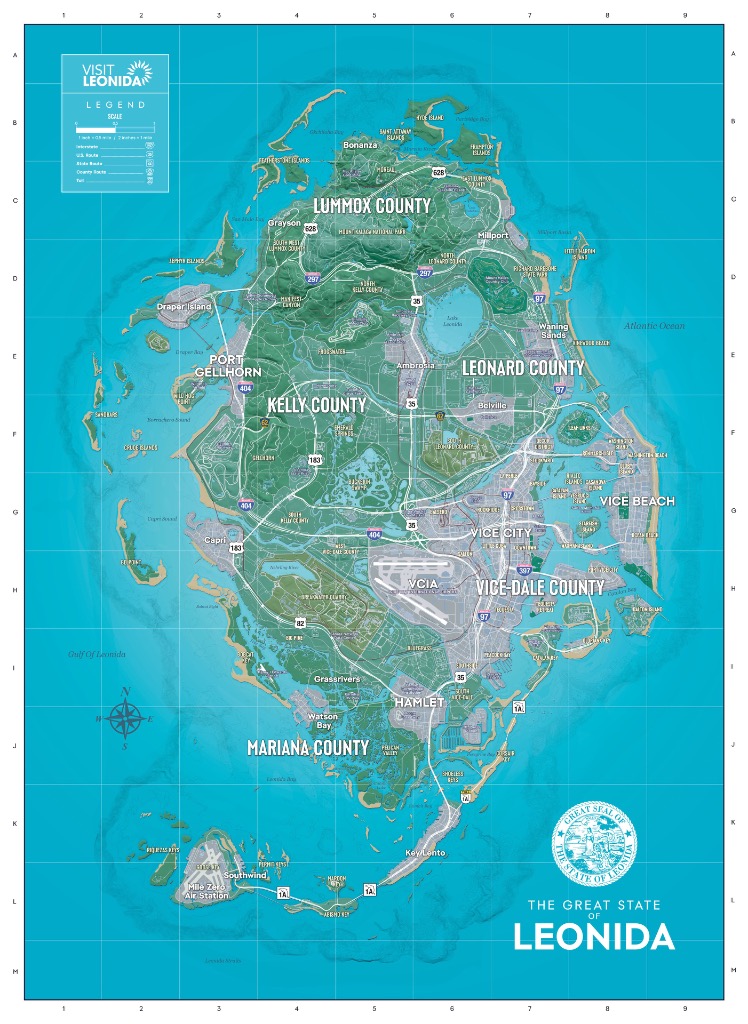
📡 Chase Where Are We?
Live Screen Capture

Minimap Crop

Click Detect Location so Chase reads the minimap + screen and matches your spot!
🧭 Leonida Exploration Finds & Stats
Total Finds
--
Explorer PTS
--
🚗 Vehicles
--
🌴 Landmarks
--
🐾 Wildlife
--
🥚 Secrets
--
👤 Characters
--
🎞️ DVR Vault
--
📱 Shorts Cut
--
📍 Timestamped Finds Log
🔎 Select a Find
--
Click any timestamped discovery on the left to preview, cut a Short, or push to socials.
No Find selected
🎙️ Latest Chase On-Air Callouts:
📡 Broadcast & Streaming Accounts
Add, edit, activate/deactivate, or delete YouTube, Twitch, Facebook, and custom RTMP destinations.
Loading broadcast accounts…
👤 Studio Workspaces
Switch or customize /remote workspace presets (show pack, bridge URL, pairing key).
Workspace @Handle
Display Name
Default Show Pack
Studio Pairing Key
Bridge URL
Ready
🤖 Studio & AI Automation Toggles
Instant controls for Chase AI Co-Host, Auto-Share Shorts, and Quick-Capture hotkeys.
⚙️ Core Studio Services
Managed by Chase Master on Chase-PC (192.168.86.21).
Loading services…
🕒 Content & Social Automations
Add, edit, activate/deactivate, run, or delete GTAVILive automations.
Loading automation scripts…
🌐 Whole-Site Settings (GTAVILive.com)
Saved to Chase-PC & public/site-settings.json so changes apply across the whole site.
Site Title
Primary Watch Handle
Site Tagline
Default Show Pack
Announcement Banner Tone
Site-Wide Announcement Text
Announcement Link URL (optional)
Ready
📺 Live Stream Metadata
Applies to YouTube, Twitch & Facebook stream titles/descriptions.
Stream Title
Stream Description
Visibility
Ready
🔌 Studio Topology & Ports
LAN hosts & ports for Chase-PC and OBS PC.
Chase-PC IP
OBS Host IP
OBS WS Port
OBS WS Password
NAS Backup Root
Ready